ADB (along with “Fastboot”) is perhaps the best tool (along with “Fastboot”) for managing your android devices. With functions ranging from a simple app install to an entire data backup. We covered all the greatness of ADB in a past post.
And the “Android x86” project is also a significant asset for an application developer (to test your apps in a virtual environment), being faster than the Android Emulator provided by Google with their Android Studio kit (yes, they do provide an x86 based image but it’s got its own problems). You’ll be better off installing Android on a VMware virtual machine anyway.
But ADB use is kinda crappy (if not downright impossible) in a VM. If you googled how to achieve this, you’ll find people telling you to “excecute “netcfg” on a terminal console”, but the command “netcfg” is not available in all android versions. So you’ll be left with a half-useful development environment.
But we found a solution: a way to get ADB working on [almost] any Android VM running on a VMware product. Read on to find out how!
First, we’ll need a few things: A VMware hypervisor: Fusion/Workstation Pro (NOTE: you can try this with Parallels Workstation/Desktop, VirtualBox or VMware Workstation Player but there’s no guarantee it’ll work. Furthermore, if you use VMware Player, the “vmnetcfg” app won’t be there making the whole process needlessly complicated), a distribution of Android x86 including and after “Android 4.4 R1” already installed on a virtual machine and “Android Platform Tools” (Google’s fancy name for ADB + fastboot. It’ll be already installed if you have Android Studio installed if not, Windows users can use this without downloading the entire 2GB suite (Mac/Linux users have no choice. If you’re planning to use ADB to push files/install apps on the Android VM, you can just get the command line tools instead of the whole thing)
That said, let’s start!
Since this is part guesswork, open Virtual Network Editor (either through the shortcut, the “Edit” menu in Workstation or [VMware Fusion > Preferences > Network > + icon] in Fusion or through “vmnetcfg” located at the install directory. Excecute with Admin/Root/Superuser rights). Click “Add Network”, select whichever free node you prefer and click OK
Configure the new network to be “Host-Only” and click “DHCP Settings”.
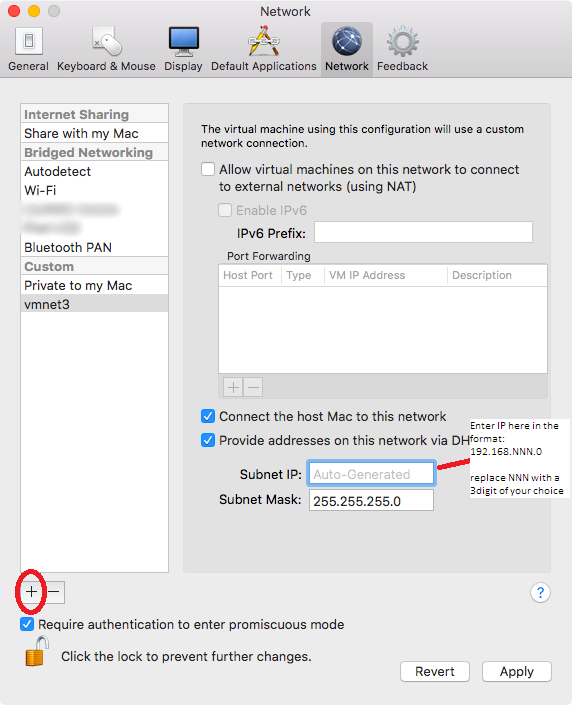

Edit the last digits of “Starting IP Address” and “Ending IP Address” to be close (numerically). So if you have:
Starting IP: 192.168.245.128
Ending IP: 192.168.245.255
Change it to:
Starting IP: 192.168.245.128
Ending IP: 192.168.245.130
Why we did this will become clear further-on.
Now connect that network adapter to an Android VM (Connected at power-on). And power-it-on.
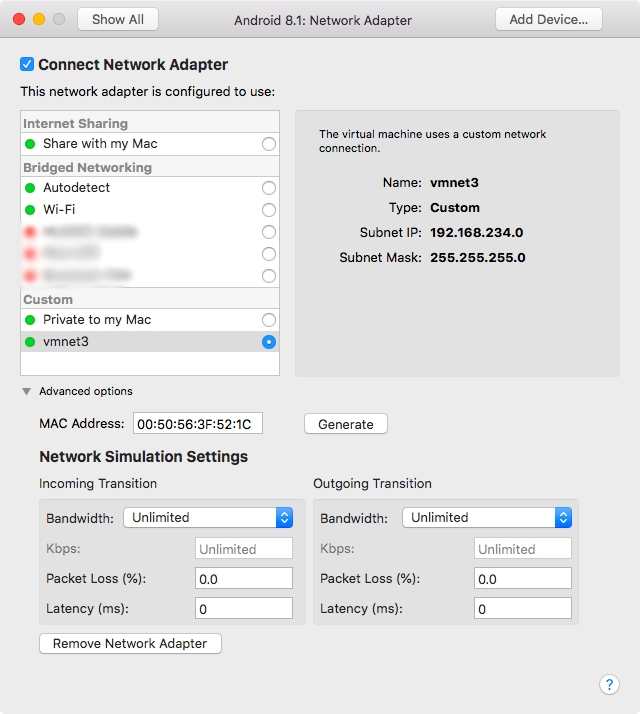
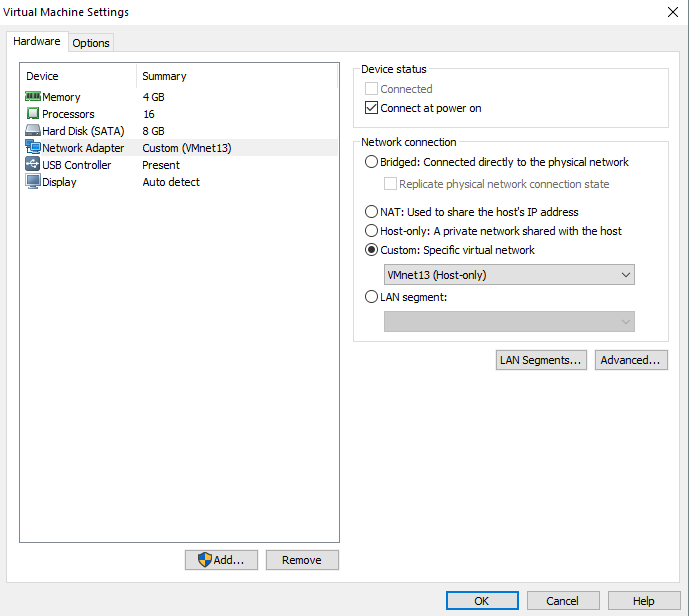
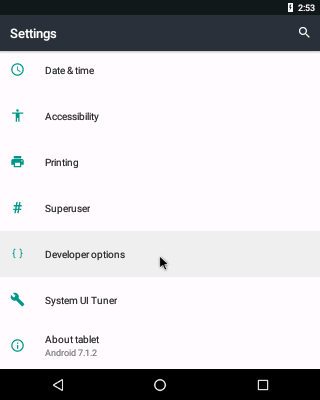
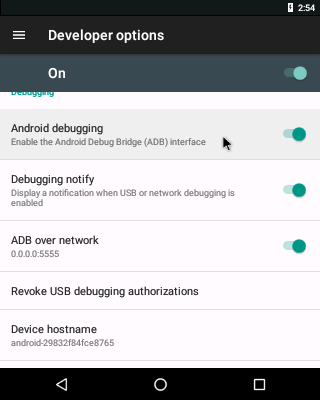
Once the Android VM finishes booting, go to Settings and enable USB Debugging + Verify Apps via ADB + ADB over network.
Open a console and execute “netcfg”. You’ll be presented with a screen similar to this.
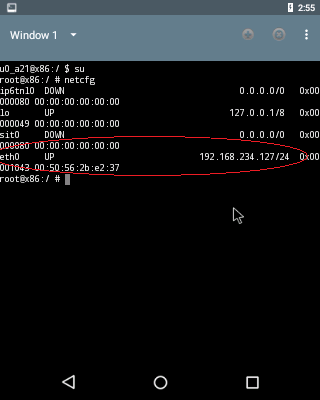
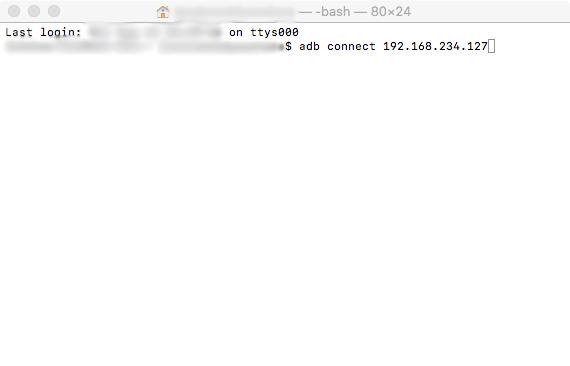
Find “eth0” IP address and execute “adb connect eth0’s IP” in a console on the Host. You’ll be presented with “connected to eth0’s IP”. Done!
But not quite. ‘Cause as we stated above, some distros of Android don’t have the “netcfg” command, in which case you’ll be left in a pickle. So when you type “netcfg” you’ll probably get this:
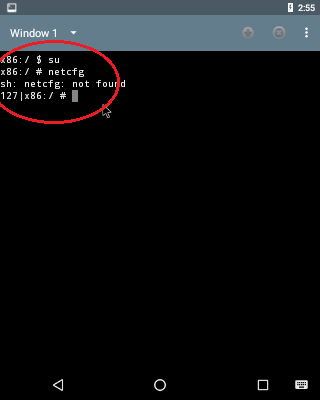
So, what now? Now this is where that guesswork comes in. Remember how we made those start-end IP addresses nearer to each other? Well this is when that helps us. Now –in a console on the host- try all those IPs ‘till one of ‘em hits home (if your start and end is like in the example, try “adb connect 192.168.245.128/129/130”, and one them will work). If ADB says that it’s connected to an IP, use ADB like a normal device. Cheers! 🙂
If that didn’t work, here’s where it becomes even more of a pain in the rear; for some strange reason, only some builds of Android x86 work with ADB like this, while others just don’t connect and stuff. Here’s a list of builds that I’ve tested to work (if other builds work, please drop a comment below):
Android 4.4 R5 (“netcfg” works)
Android 5.1 RC1 (“netcfg” works)
NOTES
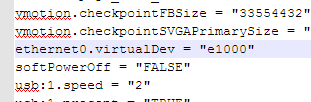
- You might need to change the network adapter to Intel 1000 in the VM’s VMX file (only on some builds).
- CyanogenMod/LineageOS x86 builds have a switch in the quick settings bar that tells you the IP of the VM, but network connectivity was often unreliable on 13.0/14.1/15.1 builds.
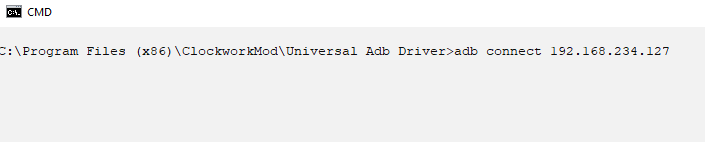
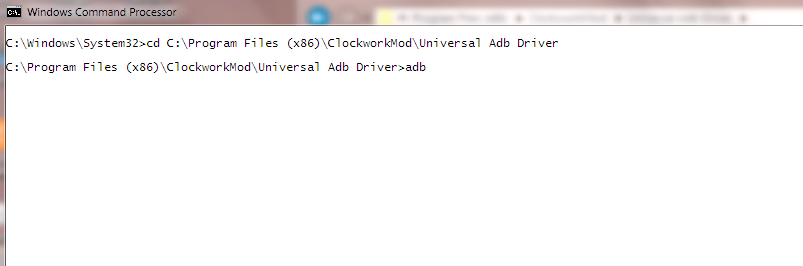
- Windows users will need to execute ADB commands in after chdir-ing to the installed directory as shown below.
- If, after sometime ADB no longer connects to Android VMs or netcfg displays “0.0.0.0” or an IP address outside of the zone you defined before, try restarting the host machine.
If everything went well, you will have a sandbox environment faster and easier to use than Android Studio.

 Help Ahoy!
Hi, always i used to check website posts here in the early hours in the dawn, for the reason that i like to gain knowledge of more and more.|
LikeLike
What’s Happening i’m new to this, I stumbled upon this I’ve found It absolutely useful and it has helped me out loads. I’m hoping to give a contribution & help different users like its aided me. Great job.|
LikeLike
I take pleasure in, cause I discovered just what I was looking for. You have ended my four day lengthy hunt! God Bless you man. Have a great day. Bye|
LikeLike
It is in reality a great and helpful piece of info. I am happy that you just shared this useful information with us. Please keep us informed like this. Thanks for sharing.|
LikeLike
It’s hard to find well-informed people for this topic, however, you sound like you know what you’re talking about! Thanks|
LikeLike
Wow that was odd. I just wrote an really long comment but after I clicked submit my comment didn’t appear. Grrrr… well I’m not writing all that over again. Regardless, just wanted to say wonderful blog!|
LikeLike
Wonderful, what a website it is! This blog gives useful information to us, keep it up.|
LikeLike
Have you ever thought about writing an ebook or guest authoring on other websites? I have a blog based upon on the same topics you discuss and would really like to have you share some stories/information. I know my audience would appreciate your work. If you are even remotely interested, feel free to shoot me an e mail.|
LikeLike
Unquestionably believe that which you said. Your favorite reason appeared to be on the internet the simplest thing to be aware of. I say to you, I certainly get annoyed while people consider worries that they plainly do not know about. You managed to hit the nail upon the top and also defined out the whole thing without having side-effects , people can take a signal. Will probably be back to get more. Thanks|
LikeLike
Thank you for another informative web site. Where else may I get that type of info written in such an ideal manner? I’ve a challenge that I am just now running on, and I have been on the glance out for such information.|
LikeLike
What’s up, the whole thing is going perfectly here and ofcourse every one is sharing data, that’s really good, keep up writing.|
LikeLike
I was recommended this website by my cousin. I’m not sure whether this post is written by him as no one else know such detailed about my trouble. You’re amazing! Thanks!|
LikeLike
Hello to every one, the contents existing at this website are actually amazing for people knowledge, well, keep up the good work fellows.|
LikeLike
I have to thank you for the efforts you have put in writing this website. I really hope to view the same high-grade blog posts from you in the future as well. In fact, your creative writing abilities has inspired me to get my own, personal blog now ;)|
LikeLike
Wonderful blog! I found it while searching on Yahoo News. Do you have any tips on how to get listed in Yahoo News? I’ve been trying for a while but I never seem to get there! Appreciate it|
LikeLike
Good day! I could have sworn I’ve been to this site before but after reading through some of the post I realized it’s new to me. Nonetheless, I’m definitely glad I found it and I’ll be book-marking and checking back often!|
LikeLike
Do you mind if I quote a few of your articles as long as I provide credit and sources back to your weblog? My blog is in the exact same area of interest as yours and my users would definitely benefit from some of the information you provide here. Please let me know if this ok with you. Many thanks!|
LikeLike
Greetings! Very helpful advice in this particular article! It’s the little changes that will make the largest changes. Thanks a lot for sharing!|
LikeLike
I have been browsing online more than three hours today, yet I never found any interesting article like yours. It’s pretty worth enough for me. In my view, if all web owners and bloggers made good content as you did, the net will be much more useful than ever before.|
LikeLike
This paragraph presents clear idea in support of the new users of blogging, that really how to do blogging and site-building.|
LikeLike
I blog quite often and I genuinely appreciate your content. The article has really peaked my interest. I will bookmark your blog and keep checking for new information about once a week. I opted in for your RSS feed as well.|
LikeLike
When someone writes an piece of writing he/she keeps the idea of a user in his/her brain that how a user can understand it. So that’s why this paragraph is great. Thanks!|
LikeLike
I am really impressed with your writing skills as neatly as with the structure to your blog. Is this a paid theme or did you customize it your self? Either way stay up the excellent quality writing, it’s rare to see a nice blog like this one today..|
LikeLike
Hello, just wanted to mention, I loved this article. It was funny. Keep on posting!|
LikeLike
Awesome website you have here but I was wanting to know if you knew of any community forums that cover the same topics talked about here? I’d really like to be a part of online community where I can get responses from other knowledgeable individuals that share the same interest. If you have any suggestions, please let me know. Appreciate it!|
LikeLike
Thanks for every other informative website. Where else could I get that type of info written in such a perfect means? I have a mission that I’m just now working on, and I have been on the glance out for such info.|
LikeLike
Have you ever considered creating an ebook or guest authoring on other sites? I have a blog based on the same topics you discuss and would love to have you share some stories/information. I know my readers would enjoy your work. If you are even remotely interested, feel free to shoot me an e-mail.|
LikeLike
Oh my goodness! Impressive article dude! Thank you so much, However I am going through troubles with your RSS. I don’t know why I can’t subscribe to it. Is there anybody else having the same RSS problems? Anyone who knows the solution can you kindly respond? Thanx!!|
LikeLike
I’ll right away take hold of your rss feed as I can’t in finding your e-mail subscription link or e-newsletter service. Do you’ve any? Kindly permit me realize so that I could subscribe. Thanks.|
LikeLike
I am really thankful to the holder of this site who has shared this fantastic article at at this time.|
LikeLike
I think the admin of this site is genuinely working hard for his web site, since here every stuff is quality based data.|
LikeLike
Hey there, You’ve done a great job. I’ll certainly digg it and personally recommend to my friends. I am sure they’ll be benefited from this site.|
LikeLike
Helpful information. Fortunate me I discovered your website by chance, and I’m surprised why this twist of fate didn’t happened earlier! I bookmarked it.|
LikeLike
It’s remarkable to pay a quick visit this website and reading the views of all colleagues about this post, while I am also keen of getting know-how.|
LikeLike
Hello would you mind stating which blog platform you’re using? I’m going to start my own blog in the near future but I’m having a hard time making a decision between BlogEngine/Wordpress/B2evolution and Drupal. The reason I ask is because your design seems different then most blogs and I’m looking for something completely unique. P.S Apologies for being off-topic but I had to ask!|
LikeLike
Very shortly this site will be famous amid all blogging and site-building users, due to it’s nice articles|
LikeLike
I seriously love your site.. Pleasant colors & theme. Did you build this site yourself? Please reply back as I’m planning to create my own personal site and would love to know where you got this from or exactly what the theme is called. Appreciate it!|
LikeLike
Hello There. I found your blog using msn. This is an extremely well written article. I will be sure to bookmark it and come back to read more of your useful information. Thanks for the post. I will definitely return.|
LikeLike
This is my first time visit at here and i am actually impressed to read all at one place.|
LikeLike
It’s remarkable to pay a visit this website and reading the views of all mates on the topic of this paragraph, while I am also zealous of getting know-how.|
LikeLike
Hi there, You’ve done an incredible job. I will certainly digg it and personally suggest to my friends. I’m sure they’ll be benefited from this web site.|
LikeLike
Just wish to say your article is as astounding. The clarity in your post is just great and i can assume you’re an expert on this subject. Well with your permission allow me to grab your RSS feed to keep updated with forthcoming post. Thanks a million and please carry on the enjoyable work.|
LikeLike
Pretty! This was a really wonderful article. Many thanks for supplying this info.|
LikeLike
Asking questions are genuinely nice thing if you are not understanding something fully, but this piece of writing presents nice understanding yet.|
LikeLike
We are a group of volunteers and starting a brand new scheme in our community. Your web site provided us with valuable information to work on. You have performed a formidable job and our entire community will be thankful to you.|
LikeLike
wonderful submit, very informative. I ponder why the other specialists of this sector don’t understand this. You should proceed your writing. I’m sure, you have a great readers’ base already!|
LikeLike
These are truly impressive ideas in on the topic of blogging. You have touched some nice factors here. Any way keep up wrinting.|
LikeLike
I like what you guys are up too. This kind of clever work and coverage! Keep up the terrific works guys I’ve included you guys to my blogroll.|
LikeLike
Hi! I know this is kind of off topic but I was wondering if you knew where I could locate a captcha plugin for my comment form? I’m using the same blog platform as yours and I’m having problems finding one? Thanks a lot!|
LikeLike
I don’t know if it’s just me or if perhaps everybody else experiencing issues with your website. It seems like some of the written text within your posts are running off the screen. Can someone else please comment and let me know if this is happening to them as well? This could be a issue with my browser because I’ve had this happen previously. Kudos|
LikeLike