“Please wait, Loading, Initializing, Loading your Data” and the loop goes on. One day or another you’ll be in the same position as this poor soul.
There comes the day when we all checkout Bluestacks. The hugely popular app player that is hugely wasting time and resources! It’s laggy, doesn’t play most apps on the market and, sadly, is still at KitKat (officially). We’ve taught before how to speed it up, but today we’ll be addressing a common issue; that is the StuckAtLoading issue.
Before we begin, please note that this guide is only for people who’ve either used older versions before, used Bluestacks a few times before or people who’ve gotten this error for the first time. Not for people who don’t have necessary requirements and all that! (The error is that you are constantly stuck on the Loading screen). Also note that you shouldn’t use and other Hypervisor programs along-side Bluestacks.
Close BS fully (from tray icon) before doing steps marked with (*).
Mind not to run any other resource intensive programs!
We will be discussing the cause and how to fix them!
It will be really helpful to have a CPU and RAM monitor like the one built into Windows 7 in gadgets. Always check if the RAM is rising on startup, if everything’s OK, the RAM should rise by 1% per second and stop at about 80% (on a computer with 4GB RAM with 3.5GB RAM given to Bluestacks)
Updating Bluestacks
You should always use the latest version of Bluestacks as it’s a very buggy app player. Plus they fix most problems in newer versions! Click the Settings icon on top of BS tab-bar and select Update.
Use of Root Tools
I know what they say but Bluestacks has the kernel in a separate module, thus whatever performance changes you do won’t affect it thus making BS kernel corrupt. I am not referring to the tools like Freedom or Lucky Patcher that just adjust software parameters, but tools like LSpeed Root and Root Master alter the device kernel and boot parameters, in other words the hardware aspects of the device.
If you think that this might be the issue, get the BS Tweaker and go to /data/app or system/app and delete the Root Tool you have (with the file manager in Tweaker right click and delete). Then take a Backup from Data section in Preferences and choose Reset all Apps and Data in Preferences. After resetting is done, and you get to the home screen, go to Preferences again and click Restore Data from Backup and follow steps.
Force Quit Bug*
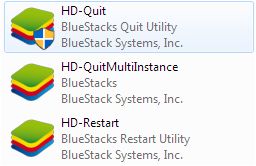
If you were ever annoyed with BS or just because it was using way too much RAM, you may have used HD-Quit tool in the BS install folder, or used some other app to kill BS. This will lead to a StuckAtLoading (check RAM percentage to be sure). If so, go to the install folder (default being C:Program files (x86)Bluestacks OR C:Program filesBluestacks) and double click the following one at a time in the given order: HD-Quit, HD-QuitMultiInstance, HD-Restart. Then open BS in normal way. If the RAM is still low click Restart in the top settings icon (cog at top of BS window). Once it restarts BS should load fine.
UAC Errors (Admin rights not granted)*

BS can also be StuckAtLoading if you have not given it sufficient rights. To check, right click the icon of BS on the Desktop, select Properties, go to Compatibility tab and check if “Run this program as an administrator” is ticked. Start BS, it should work fine.
Graphics Errors*

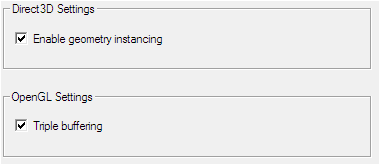


BS wil also fail to load if graphic errors occur. To fix these, check if settings like OpenGL Triple Buffering and Geometry Instancing are enabled (Full list on ATI VGA: Vertical Refresh ON/ all other settings set to a mid-mark). Once checked go to Properties > Compatibility of that BS icon again and tick “Disable Visual Themes” and “Disable Display Scaling”. Try to start BS.
Compatibility Errors*
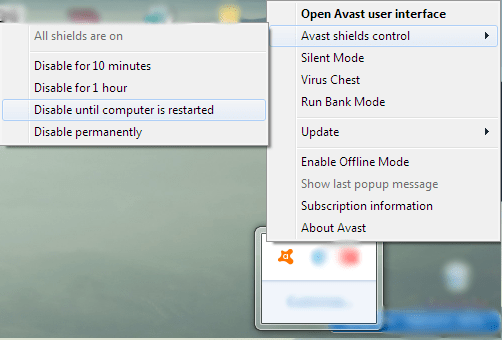
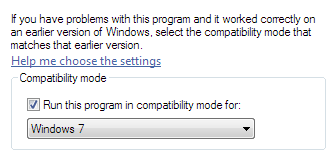
Sometimes BS doesn’t work because of compatibility with the system. To fix icon right click Properties > Compatibility > tick Run Program in Compatibility Mode for: Windows 7. Start BS. If it doesn’t seem to work try disabling antivirus as well (WITH CAUTION).
Too Big Screen Size*
Sorry if you got just to play apps on a bigger screen! Try changing your resolution to something like 1024 X 768 (optimum). (Only Windows) (Winkey + R, regedit) Also try changing the Registry entry (HKEY_LOCAL_MACHINE > Software > Bluestacks > Guests > Android > Frame Buffer > 0) Guest Height: 480 and Guest Width: 640 (Decimal). Change by right clicking on entry and clicking Modify then saving the entry when done.
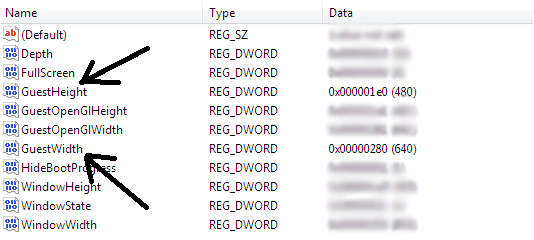
Make it or Break it!
If all these methods fail for you, then don’t take any Backups (say bye, bye to your apps and data! L) and click Reset in BS Preferences > Data and start fresh! If you’re too chicken, surf the web and try out other methods, but I tell you, I’ve seen all this (been there, done that) before and these were the only successful fixes I came across.
Conclusion
Is that you should try out other app players as your system permits. (There’s a great round-up of all the best android emulators Here). Only try out solutions you find in reputable sites, don’t go near those shady sites and never grant Admin rights if a shady program (I should think ad-ware) asks for it. But don’t stop your curiosity!
 Help Ahoy!
Hello, everything is going well here and ofcourse every one is sharing information, that’s genuinely good, keep up writing.|
LikeLike
I think this is among the most vital information for me. And i’m glad reading your article. But want to remark on some general things, The website style is great, the articles is really great : D. Good job, cheers|
LikeLike
Attractive component of content. I simply stumbled upon your blog and in accession capital to claim that I acquire in fact enjoyed account your blog posts. Anyway I will be subscribing in your augment and even I fulfillment you get admission to persistently rapidly.|
LikeLike
Hello There. I discovered your weblog using msn. This is a very well written article. I’ll make sure to bookmark it and return to learn extra of your helpful info. Thank you for the post. I will certainly comeback.|
LikeLike
What’s up colleagues, fastidious post and good arguments commented here, I am really enjoying by these.|
LikeLike
Spot on with this write-up, I actually feel this site needs much more attention. I’ll probably be back again to read more, thanks for the information!|
LikeLike
I am sure this post has touched all the internet people, its really really nice post on building up new weblog.|
LikeLike
When I initially commented I appear to have clicked on the -Notify me when new comments are added- checkbox and from now on every time a comment is added I receive four emails with the same comment. Perhaps there is a means you are able to remove me from that service? Thanks!|
LikeLike
Amazing blog! Do you have any tips for aspiring writers? I’m hoping to start my own website soon but I’m a little lost on everything. Would you suggest starting with a free platform like WordPress or go for a paid option? There are so many options out there that I’m totally overwhelmed .. Any suggestions? Appreciate it!|
LikeLike
Hi, I do believe this is a great blog. I stumbledupon it 😉 I’m going to come back once again since i have saved as a favorite it. Money and freedom is the best way to change, may you be rich and continue to guide others.|
LikeLike
It’s an amazing piece of writing designed for all the internet people; they will take benefit from it I am sure.|
LikeLike
Ahaa, its nice dialogue about this post here at this web site, I have read all that, so at this time me also commenting here.|
LikeLike
What’s Going down i am new to this, I stumbled upon this I’ve discovered It positively useful and it has aided me out loads. I am hoping to give a contribution & help different users like its aided me. Good job.|
LikeLike
Hey! I’m at work browsing your blog from my new iphone! Just wanted to say I love reading your blog and look forward to all your posts! Keep up the fantastic work!|
LikeLike
I for all time emailed this website post page to all my friends, since if like to read it next my contacts will too.|
LikeLike
Every weekend i used to visit this web page, as i wish for enjoyment, since this this site conations in fact pleasant funny data too.|
LikeLike
My partner and I absolutely love your blog and find nearly all of your post’s to be what precisely I’m looking for. can you offer guest writers to write content for you personally? I wouldn’t mind producing a post or elaborating on a number of the subjects you write related to here. Again, awesome web log!|
LikeLike
Wonderful blog! I found it while browsing on Yahoo News. Do you have any tips on how to get listed in Yahoo News? I’ve been trying for a while but I never seem to get there! Many thanks|
LikeLike
Excellent goods from you, man. I have understand your stuff previous to and you are just too wonderful. I actually like what you have acquired here, really like what you are stating and the way in which you say it. You make it enjoyable and you still take care of to keep it sensible. I cant wait to read far more from you. This is actually a great site.|
LikeLike
Thank you for sharing your thoughts. I truly appreciate your efforts and I am waiting for your further post thank you once again.|
LikeLike
Good way of describing, and fastidious article to obtain information on the topic of my presentation focus, which i am going to convey in institution of higher education.|
LikeLike
Excellent web site you have here.. It’s hard to find good quality writing like yours nowadays. I honestly appreciate people like you! Take care!!|
LikeLike
I like the valuable info you provide in your articles. I’ll bookmark your weblog and check again here regularly. I’m quite certain I’ll learn plenty of new stuff right here! Best of luck for the next!|
LikeLike
I was recommended this blog by way of my cousin. I am no longer sure whether or not this submit is written via him as nobody else realize such specific about my difficulty. You’re wonderful! Thank you!|
LikeLike
Just want to say your article is as astonishing. The clearness on your put up is just cool and i can think you’re knowledgeable in this subject. Well along with your permission allow me to clutch your feed to keep up to date with approaching post. Thanks one million and please continue the rewarding work.|
LikeLike
I savour, lead to I discovered just what I was taking a look for. You have ended my 4 day long hunt! God Bless you man. Have a great day. Bye|
LikeLike
Excellent post. I was checking constantly this weblog and I am inspired! Very useful info particularly the last section 🙂 I deal with such info a lot. I was seeking this certain info for a long time. Thank you and good luck. |
LikeLike
I am regular reader, how are you everybody? This post posted at this website is genuinely good.|
LikeLike
Hey There. I found your blog using msn. This is a very well written article. I will make sure to bookmark it and come back to read more of your useful information. Thanks for the post. I’ll certainly comeback.|
LikeLike
Hey! Someone in my Facebook group shared this website with us so I came to take a look. I’m definitely loving the information. I’m book-marking and will be tweeting this to my followers! Fantastic blog and great design and style.|
LikeLike
Great article! We will be linking to this great article on our site. Keep up the great writing.|
LikeLike
Write more, thats all I have to say. Literally, it seems as though you relied on the video to make your point. You clearly know what youre talking about, why waste your intelligence on just posting videos to your site when you could be giving us something informative to read?|
LikeLike
I must thank you for the efforts you’ve put in writing this website. I really hope to view the same high-grade blog posts from you in the future as well. In fact, your creative writing abilities has encouraged me to get my own blog now ;)|
LikeLike
Your style is so unique compared to other folks I’ve read stuff from. Thank you for posting when you’ve got the opportunity, Guess I’ll just book mark this page.|
LikeLike
Hi everyone, it’s my first pay a visit at this site, and paragraph is in fact fruitful in support of me, keep up posting these types of articles.|
LikeLike
Wonderful items from you, man. I have understand your stuff prior to and you are just extremely magnificent. I really like what you’ve bought right here, really like what you are stating and the best way through which you assert it. You’re making it entertaining and you continue to take care of to keep it sensible. I cant wait to learn much more from you. This is really a terrific site.|
LikeLike
What’s Taking place i’m new to this, I stumbled upon this I have discovered It absolutely useful and it has helped me out loads. I’m hoping to contribute & help other customers like its aided me. Good job.|
LikeLike
If some one wishes to be updated with newest technologies afterward he must be visit this web site and be up to date daily.|
LikeLike
Very nice post. I just stumbled upon your blog and wanted to say that I have really enjoyed surfing around your blog posts. In any case I will be subscribing to your feed and I’m hoping you write again soon!|
LikeLike
It’s fantastic that you are getting ideas from this paragraph as well as from our dialogue made at this time.|
LikeLike
each time i used to read smaller articles which also clear their motive, and that is also happening with this piece of writing which I am reading at this place.|
LikeLike
Howdy! Someone in my Myspace group shared this website with us so I came to give it a look. I’m definitely loving the information. I’m bookmarking and will be tweeting this to my followers! Great blog and terrific design and style.|
LikeLike
When someone writes an post he/she retains the thought of a user in his/her brain that how a user can be aware of it. So that’s why this piece of writing is great. Thanks!|
LikeLike
Good web site you’ve got here.. It’s hard to find excellent writing like yours these days. I honestly appreciate people like you! Take care!!|
LikeLike
Heya i am for the first time here. I found this board and I find It really useful & it helped me out a lot. I hope to give something back and help others like you helped me.|
LikeLike
An outstanding share! I’ve just forwarded this onto a colleague who had been conducting a little homework on this. And he actually ordered me lunch because I discovered it for him… lol. So let me reword this…. Thank YOU for the meal!! But yeah, thanks for spending time to talk about this matter here on your web page.|
LikeLike
This is a topic which is close to my heart… Many thanks! Where are your contact details though?|
LikeLike
Greetings! Very useful advice within this article! It’s the little changes that make the largest changes. Thanks for sharing!|
LikeLike
Hi, I log on to your blog on a regular basis. Your story-telling style is witty, keep doing what you’re doing!|
LikeLike
This website was… how do you say it? Relevant!! Finally I have found something which helped me. Thanks!|
LikeLike