“Please wait, Loading, Initializing, Loading your Data” and the loop goes on. One day or another you’ll be in the same position as this poor soul.
There comes the day when we all checkout Bluestacks. The hugely popular app player that is hugely wasting time and resources! It’s laggy, doesn’t play most apps on the market and, sadly, is still at KitKat (officially). We’ve taught before how to speed it up, but today we’ll be addressing a common issue; that is the StuckAtLoading issue.
Before we begin, please note that this guide is only for people who’ve either used older versions before, used Bluestacks a few times before or people who’ve gotten this error for the first time. Not for people who don’t have necessary requirements and all that! (The error is that you are constantly stuck on the Loading screen). Also note that you shouldn’t use and other Hypervisor programs along-side Bluestacks.
Close BS fully (from tray icon) before doing steps marked with (*).
Mind not to run any other resource intensive programs!
We will be discussing the cause and how to fix them!
It will be really helpful to have a CPU and RAM monitor like the one built into Windows 7 in gadgets. Always check if the RAM is rising on startup, if everything’s OK, the RAM should rise by 1% per second and stop at about 80% (on a computer with 4GB RAM with 3.5GB RAM given to Bluestacks)
Updating Bluestacks
You should always use the latest version of Bluestacks as it’s a very buggy app player. Plus they fix most problems in newer versions! Click the Settings icon on top of BS tab-bar and select Update.
Use of Root Tools
I know what they say but Bluestacks has the kernel in a separate module, thus whatever performance changes you do won’t affect it thus making BS kernel corrupt. I am not referring to the tools like Freedom or Lucky Patcher that just adjust software parameters, but tools like LSpeed Root and Root Master alter the device kernel and boot parameters, in other words the hardware aspects of the device.
If you think that this might be the issue, get the BS Tweaker and go to /data/app or system/app and delete the Root Tool you have (with the file manager in Tweaker right click and delete). Then take a Backup from Data section in Preferences and choose Reset all Apps and Data in Preferences. After resetting is done, and you get to the home screen, go to Preferences again and click Restore Data from Backup and follow steps.
Force Quit Bug*
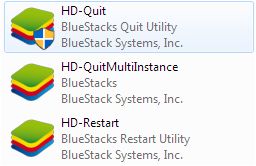
If you were ever annoyed with BS or just because it was using way too much RAM, you may have used HD-Quit tool in the BS install folder, or used some other app to kill BS. This will lead to a StuckAtLoading (check RAM percentage to be sure). If so, go to the install folder (default being C:Program files (x86)Bluestacks OR C:Program filesBluestacks) and double click the following one at a time in the given order: HD-Quit, HD-QuitMultiInstance, HD-Restart. Then open BS in normal way. If the RAM is still low click Restart in the top settings icon (cog at top of BS window). Once it restarts BS should load fine.
UAC Errors (Admin rights not granted)*

BS can also be StuckAtLoading if you have not given it sufficient rights. To check, right click the icon of BS on the Desktop, select Properties, go to Compatibility tab and check if “Run this program as an administrator” is ticked. Start BS, it should work fine.
Graphics Errors*

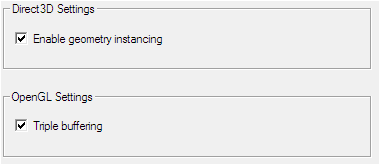


BS wil also fail to load if graphic errors occur. To fix these, check if settings like OpenGL Triple Buffering and Geometry Instancing are enabled (Full list on ATI VGA: Vertical Refresh ON/ all other settings set to a mid-mark). Once checked go to Properties > Compatibility of that BS icon again and tick “Disable Visual Themes” and “Disable Display Scaling”. Try to start BS.
Compatibility Errors*
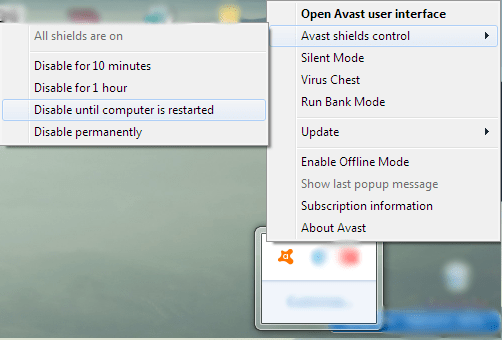
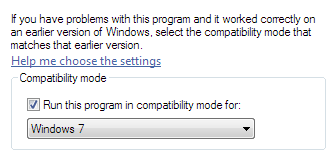
Sometimes BS doesn’t work because of compatibility with the system. To fix icon right click Properties > Compatibility > tick Run Program in Compatibility Mode for: Windows 7. Start BS. If it doesn’t seem to work try disabling antivirus as well (WITH CAUTION).
Too Big Screen Size*
Sorry if you got just to play apps on a bigger screen! Try changing your resolution to something like 1024 X 768 (optimum). (Only Windows) (Winkey + R, regedit) Also try changing the Registry entry (HKEY_LOCAL_MACHINE > Software > Bluestacks > Guests > Android > Frame Buffer > 0) Guest Height: 480 and Guest Width: 640 (Decimal). Change by right clicking on entry and clicking Modify then saving the entry when done.
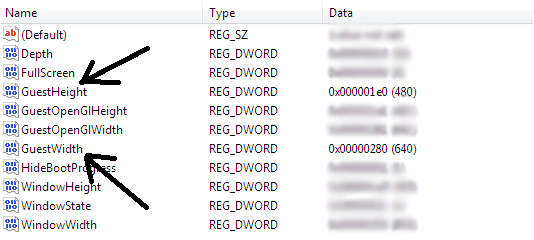
Make it or Break it!
If all these methods fail for you, then don’t take any Backups (say bye, bye to your apps and data! L) and click Reset in BS Preferences > Data and start fresh! If you’re too chicken, surf the web and try out other methods, but I tell you, I’ve seen all this (been there, done that) before and these were the only successful fixes I came across.
Conclusion
Is that you should try out other app players as your system permits. (There’s a great round-up of all the best android emulators Here). Only try out solutions you find in reputable sites, don’t go near those shady sites and never grant Admin rights if a shady program (I should think ad-ware) asks for it. But don’t stop your curiosity!
 Help Ahoy!
Heya i’m for the first time here. I came across this board and I find It really useful & it helped me out much. I hope to give something back and help others like you helped me.|
LikeLike
Thank you for some other magnificent post. Where else could anybody get that kind of info in such an ideal manner of writing? I’ve a presentation next week, and I’m at the search for such info.|
LikeLike
hi!,I love your writing very much! share we keep in touch extra about your article on AOL? I require an expert on this area to resolve my problem. May be that is you! Having a look ahead to see you. |
LikeLike
Hi there, I log on to your blog on a regular basis. Your humoristic style is awesome, keep doing what you’re doing!|
LikeLike
I like the helpful info you provide in your articles. I will bookmark your blog and check again here regularly. I’m quite sure I’ll learn many new stuff right here! Good luck for the next!|
LikeLike
What’s Happening i am new to this, I stumbled upon this I’ve found It absolutely useful and it has aided me out loads. I’m hoping to give a contribution & aid different customers like its helped me. Good job.|
LikeLike
Useful information. Fortunate me I discovered your web site unintentionally, and I’m shocked why this accident did not happened earlier! I bookmarked it.|
LikeLike
Asking questions are truly nice thing if you are not understanding anything entirely, but this article offers fastidious understanding even.|
LikeLike
I really like what you guys are up too. Such clever work and coverage! Keep up the good works guys I’ve included you guys to blogroll.|
LikeLike
I blog often and I truly appreciate your content. The article has truly peaked my interest. I’m going to take a note of your website and keep checking for new information about once per week. I opted in for your RSS feed too.|
LikeLike
Excellent blog right here! Also your web site rather a lot up fast! What host are you the usage of? Can I am getting your associate link in your host? I want my website loaded up as quickly as yours lol|
LikeLike
I am genuinely pleased to glance at this web site posts which consists of tons of valuable facts, thanks for providing these data.|
LikeLike
Good day! I could have sworn I’ve been to this website before but after browsing through many of the posts I realized it’s new to me. Regardless, I’m definitely happy I discovered it and I’ll be bookmarking it and checking back frequently!|
LikeLike
I love it when individuals come together and share opinions. Great website, keep it up!|
LikeLike
Hello mates, how is the whole thing, and what you want to say regarding this post, in my view its actually awesome for me.|
LikeLike
Greate post. Keep writing such kind of info on your site. Im really impressed by your blog.
LikeLike
Hello! This post could not be written any better! Reading through this post reminds me of my previous room mate! He always kept talking about this. I will forward this write-up to him. Fairly certain he will have a good read. Thanks for sharing!|
LikeLike
Wow, this paragraph is pleasant, my younger sister is analyzing these things, therefore I am going to convey her.|
LikeLike
Heya i am for the first time here. I found this board and I find It truly useful & it helped me out much. I hope to give something back and help others like you aided me.|
LikeLike
I’m not that much of a internet reader to be honest but your blogs really nice, keep it up! I’ll go ahead and bookmark your site to come back later on. Many thanks|
LikeLike
This piece of writing is really a good one it helps new net viewers, who are wishing for blogging.|
LikeLike
If some one desires to be updated with most up-to-date technologies therefore he must be go to see this website and be up to date daily.|
LikeLike
What’s up i am kavin, its my first occasion to commenting anyplace, when i read this piece of writing i thought i could also create comment due to this brilliant piece of writing.|
LikeLike
Hurrah, that’s what I was searching for, what a material! existing here at this web site, thanks admin of this web page.|
LikeLike
Hello there, You’ve performed an excellent job. I will definitely digg it and individually suggest to my friends. I’m sure they’ll be benefited from this site.|
LikeLike
My brother suggested I might like this web site. He was totally right. This post truly made my day. You cann’t imagine just how much time I had spent for this info! Thanks!|
LikeLike
Generally I do not learn post on blogs, however I would like to say that this write-up very pressured me to try and do it! Your writing taste has been amazed me. Thanks, very great post.|
LikeLike
Great blog here! Also your web site loads up very fast! What host are you using? Can I get your affiliate link to your host? I wish my web site loaded up as fast as yours lol|
LikeLike
fantastic points altogether, you simply received a brand new reader. What would you suggest in regards to your post that you simply made a few days ago? Any positive?|
LikeLike
Great article! This is the type of info that are supposed to be shared across the internet. Disgrace on the search engines for no longer positioning this submit higher! Come on over and visit my site . Thank you =)|
LikeLike
Hey are using WordPress for your blog platform? I’m new to the blog world but I’m trying to get started and set up my own. Do you need any coding expertise to make your own blog? Any help would be really appreciated!|
LikeLike
We’re a group of volunteers and starting a brand new scheme in our community. Your website provided us with helpful information to work on. You have done a formidable task and our entire group can be thankful to you.|
LikeLike
I’m gone to say to my little brother, that he should also pay a quick visit this weblog on regular basis to get updated from latest news.|
LikeLike
Howdy! Do you use Twitter? I’d like to follow you if that would be ok. I’m absolutely enjoying your blog and look forward to new posts.|
LikeLike
I every time spent my half an hour to read this weblog’s content all the time along with a cup of coffee.|
LikeLike
Good way of explaining, and pleasant article to get information about my presentation focus, which i am going to deliver in university.|
LikeLike
Wonderful blog! Do you have any recommendations for aspiring writers? I’m hoping to start my own blog soon but I’m a little lost on everything. Would you propose starting with a free platform like WordPress or go for a paid option? There are so many choices out there that I’m completely confused .. Any recommendations? Appreciate it!|
LikeLike
I’ve been browsing online more than 3 hours today, yet I never found any interesting article like yours. It is pretty worth enough for me. In my view, if all website owners and bloggers made good content as you did, the internet will be a lot more useful than ever before.|
LikeLike
After looking at a number of the blog posts on your web page, I really like your technique of blogging. I bookmarked it to my bookmark website list and will be checking back soon. Take a look at my website as well and tell me your opinion.|
LikeLike
Hi! This is my first visit to your blog! We are a collection of volunteers and starting a new initiative in a community in the same niche. Your blog provided us useful information to work on. You have done a outstanding job!|
LikeLike
bookmarked!!, I like your website!|
LikeLike
I just like the helpful info you supply in your articles. I will bookmark your blog and check once more here frequently. I’m reasonably certain I will be informed lots of new stuff proper right here! Best of luck for the next!|
LikeLike
whoah this blog is fantastic i like reading your posts. Keep up the good work! You recognize, a lot of individuals are hunting around for this information, you could aid them greatly. |
LikeLike
Right here is the right site for anybody who hopes to understand this topic. You understand so much its almost hard to argue with you (not that I really would want to…HaHa). You certainly put a brand new spin on a subject that’s been written about for decades. Wonderful stuff, just great!|
LikeLike
Good day very nice blog!! Man .. Excellent .. Amazing .. I’ll bookmark your blog and take the feeds also? I’m satisfied to seek out so many useful info here within the submit, we want work out extra strategies on this regard, thank you for sharing. . . . . .|
LikeLike
Hola! I’ve been following your weblog for a long time now and finally got the courage to go ahead and give you a shout out from Porter Tx! Just wanted to tell you keep up the good job!|
LikeLike
Heya i’m for the first time here. I found this board and I find It truly helpful & it helped me out much. I hope to provide something back and help others such as you helped me.|
LikeLike
First off I would like to say wonderful blog! I had a quick question in which I’d like to ask if you do not mind. I was interested to find out how you center yourself and clear your thoughts prior to writing. I’ve had difficulty clearing my mind in getting my thoughts out. I do enjoy writing but it just seems like the first 10 to 15 minutes tend to be wasted simply just trying to figure out how to begin. Any recommendations or tips? Appreciate it!|
LikeLike
Wow, fantastic blog layout! How long have you been blogging for? you make blogging look easy. The overall look of your website is excellent, let alone the content!|
LikeLike